
Crossplay · v1.0.3
How Palworld crossplay works across PC, Xbox, PS5, and Mac
- Reading time
- 7 minutes
- Difficulty
- Network setup
- Checked
- 2026-08-30
On this page
Guide details
Before you begin
Connect the current platform pool, choose between Community Server and direct-address routes, configure the server correctly, and isolate port or router failures.
Current all-platform crossplay through Palworld v1.0.3, the join route available to each platform, public server settings, default network port, and the safest checks for connection failures.
- Status
- Checked against official Palworld notes and server documentation
- Edition
- v1.0.3
- Platform
- Steam · Xbox · PlayStation 5 · macOS
- Checked
- 2026-08-30
- Check note
- Official v0.5.0 notes introduced all-platform crossplay; the current server documentation defines Community Server, direct-address, platform-list, and network requirements.
Before you set out
Prerequisites#
- Update every client to the same current Palworld version before changing network settings.
- Decide whether console players need the in-game Community Server list or whether PC and Mac players will use a direct IP and port.
- For a self-hosted server, keep administrator access to its launch arguments, PalWorldSettings.ini, firewall, and router port-forwarding page.
Visual reference
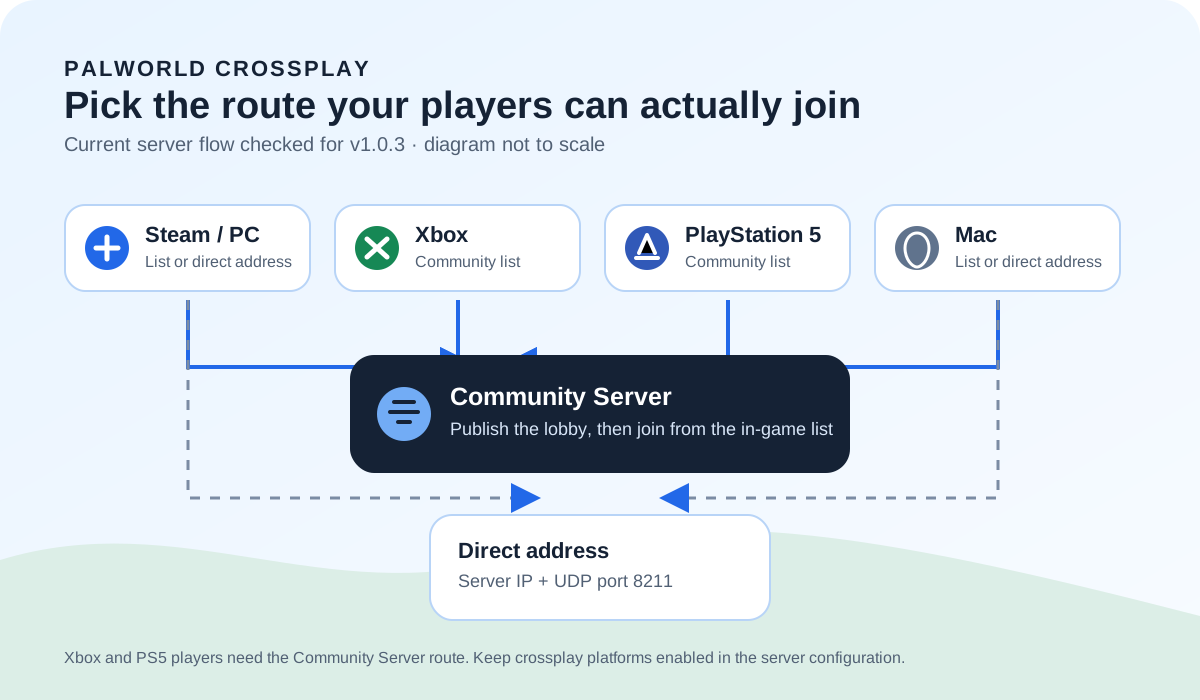
Choose the server path each platform can join#
Route kit
Match the join method to the group#
The game supports the same shared platform pool, but the way a player reaches a server still depends on platform and server visibility.
| Item | Need | Why it matters |
|---|---|---|
| Community Server listing | Required | Use this route when Xbox or PlayStation 5 players need to join a player-hosted server from the in-game list. |
| Server IP and port | Optional | Steam and Mac players can use a Dedicated Server address directly when the host does not need console discovery. |
| Matching client version | Required | A version mismatch can block a join even when the public listing and ports are correct. |
Route 03
Set up a clean crossplay connection#
Prove one route with one joining player before adding the rest of the group.
Update the server and every player#
Restart the game clients, apply the same current version, and restart a self-hosted server after updating its files.
Choose Community Server or direct address#
Publish a Community Server for Xbox or PS5 discovery. For Steam and Mac only, a reachable Dedicated Server IP and port can be enough.
Enable the current platform list#
Use CrossplayPlatforms=(Steam,Xbox,PS5,Mac) in the server settings. Remove advice that still relies on the retired AllowConnectPlatform option.
Open and forward the game port#
Allow the configured UDP game port through the host firewall and forward it to the server. The documented default is UDP 8211.
Test from outside the host network#
Invite one external player first. If outside players join but someone on the same LAN cannot, check the router's hairpin NAT behavior before changing game files.
Desk answer
Current public crossplay settings#
Use the public-lobby launch option when the server must appear in the Community Server list, and keep all intended platforms in the current crossplay array.
-publiclobby
CrossplayPlatforms=(Steam,Xbox,PS5,Mac)
Fault ledger
If Palworld crossplay still will not connect#
- Xbox or PS5 cannot find the server
- Confirm it is published as a Community Server, includes the console platform in CrossplayPlatforms, and has restarted since the configuration changed.
- Direct IP joins time out
- Confirm the external IP and configured port, allow UDP 8211 or the replacement game port through the firewall, and verify the router forwards it to the correct host.
- Outside players connect but a same-LAN player cannot
- Check whether the router supports hairpin NAT. This pattern can be a local routing limitation rather than a broken crossplay setting.
- An old guide uses AllowConnectPlatform
- Replace that retired option with the current CrossplayPlatforms list and restart the server before testing again.
Field questions
Palworld crossplay questions#
- Can Xbox and PS5 join a Palworld Dedicated Server?
- They can join a player-hosted server when it is published as a Community Server and appears in the in-game server list.
- What port does a Palworld server use?
- The documented default game port is UDP 8211, although an administrator can configure a different port.
- Does Palworld crossplay include Mac?
- Yes. The current crossplay platform list includes Mac alongside Steam, Xbox, and PlayStation 5.